Scale what works
Scaling is the last step, not the plan. You scale a campaign after it earned a works verdict: delivery proven, replies conclusively above the threshold you set from your own economics. Anything short of that is a guess, and sending more of a guess only makes it expensive.
This chapter covers how to scale a proven campaign without spoiling it: run it as a separate campaign, add mailboxes and raise the daily limit step by step, keep delivery and unsubscribes under watch, handle the extra replies, track conversations to a decision, run good calls, and know when to stop and go back to an experiment.
Scale only after a works verdict
The previous chapter ended with four possible verdicts: works, doesn't work, grey zone, invalid. Only one of them is a reason to scale. A campaign that never reached a verdict hasn't told you anything yet. Sending it to ten times more companies doesn't answer the question. It just spends ten times more of your segment on an unanswered one.
Before you add a single mailbox, check three things:
- Delivery passed. The delivery check came back clean on the real message, from the same domains and sending setup.
- Interest is conclusive. Replies were above your threshold at the sample size you chose in advance, read once, not by peeking until the number looked good.
- The segment has room. There are enough matching companies left that nobody has emailed. If the experiment used up most of the segment, there is nothing to scale into.
If any of the three is missing, you're not scaling yet. Go back to the experiment. The Experiment Playbook walks through the whole loop, from the first test to the scale-up.
Run it as a separate campaign
Don't raise the limits on the experiment itself. Close it with its verdict and start a new campaign for the scale-up. The experiment's numbers stay clean, and you keep a record of what was proven and on which sample. If the scaled campaign later goes wrong, you can compare it against a baseline that nobody touched.
The scaled campaign copies what won and changes only how much it sends:
- Same segment definition. Same filters, same persona, still excluding every company you've already contacted, including the ones in the experiment.
- Same offer and copy. Same subject variants, same body, same sequence steps and delays. A new subject line or an extra follow-up is a new offer, and it needs its own experiment.
- More mailboxes and a higher daily limit. Add warmed mailboxes on separate domains and raise the daily limit in steps over a few weeks. Don't jump straight to the final number.
- Full automation. The experiment may have had a human approve each message. The scaled campaign should run on its own, with enrichment, qualification and sending automated, so your time goes into replies.
You will notice subgroups inside the segment that seem to react differently: a certain company size, a certain job title. Resist the urge to rewrite the scaled campaign for them. Each subgroup is a new hypothesis. Give it its own experiment on fresh companies, and scale it only if it earns its own verdict.
Sellvance autopilot campaigns keep a proven campaign running on their own: a saved search adds new matching companies and skips every one on its rejected list, enrichment and AI qualification decide who fits, and AI writes and reviews each message before it goes out across your mailboxes.
See outreach automationKeep mailboxes and domains healthy
More sending means more chances to damage the reputation that made delivery pass in the first place. The practical rules don't change, but they matter more.
Keep warmup running
Don't switch warmup off once the campaign is live. Warmup emails get opened, replied to and moved out of spam, and those signals balance out the cold emails nobody answers. Without them, providers slowly lose trust in your domains. Keep every mailbox on a small daily warmup schedule, around 10–15 warmup emails alongside its cold sends. Treat it as maintenance, not a setup step.
Add mailboxes, not pressure
When you need more daily sends, add mailboxes on new domains and warm them before they join the campaign. Don't push existing mailboxes past the limit they were warmed for. A new mailbox joins at a low limit and grows with the rest.
Check blacklists
Use MXToolbox weekly to check your sending domains and IPs. There are dozens of lists. The two that matter most are Spamhaus and Barracuda. If you're listed, find and fix the cause first: sending too fast, a stale list, complaints. Then request delisting through their site with a note on what you changed. Listings are recoverable if you act quickly.
Test inbox placement regularly
Send the real message to seed addresses at Gmail, Outlook, Yahoo and other providers, and check where it lands: inbox, promotions or spam. Do it weekly while the campaign runs, and after any change to domains, mailboxes or the daily limit. If one mailbox starts landing in spam, pause its cold sends and let warmup run until it recovers.
Keep the content clean
- One link at most. Several links in a short email look like spam.
- No images. Mostly-image emails trip filters, and cold email doesn't need them.
- Think twice about tracking pixels. Some filters flag them, and open tracking isn't a signal you base a verdict on.
- Check linked domains. A link to a domain with a bad reputation drags your email down with it.
Sellvance buys and manages your sending domains, sets up DNS and mailboxes, and runs inbox placement tests on your real messages. Adding mailboxes for a scale-up is the same flow you used for the experiment.
See email infrastructureHandle more replies without drowning
A scaled campaign brings more replies, and most of them are routine: auto-replies, "not interested", unsubscribe requests. A few need a real, thoughtful answer. Sort every reply the moment it arrives, so your attention goes to the conversations that can turn into customers.
Interested
"Tell me more", "What does pricing look like?", "Can we talk?" These come first and need a fast, personal answer.
Keep following up with interested leads until you get a clear outcome: a booked call, a yes or a firm no. Many deals are lost because someone stopped after two exchanges. Record each one right away with a clear status.
Not Right Now
"Not a priority this quarter" or "We just signed with someone else" isn't a rejection. It's a timing signal from someone who agreed the problem is real.
Move these leads into their own segment with a date to follow up. Tag them automatically when they reply, so nobody has to remember hundreds of "later" leads.
Out of Office
Auto-replies are also your delivery signal: they only come back from mail that arrived. Keep counting them, as you did in the experiment.
For the lead, pause the sequence and send the missed message about a week after the stated return date. Better still, detect these replies automatically, pull out the return date, and schedule the follow-up without anyone reading them.
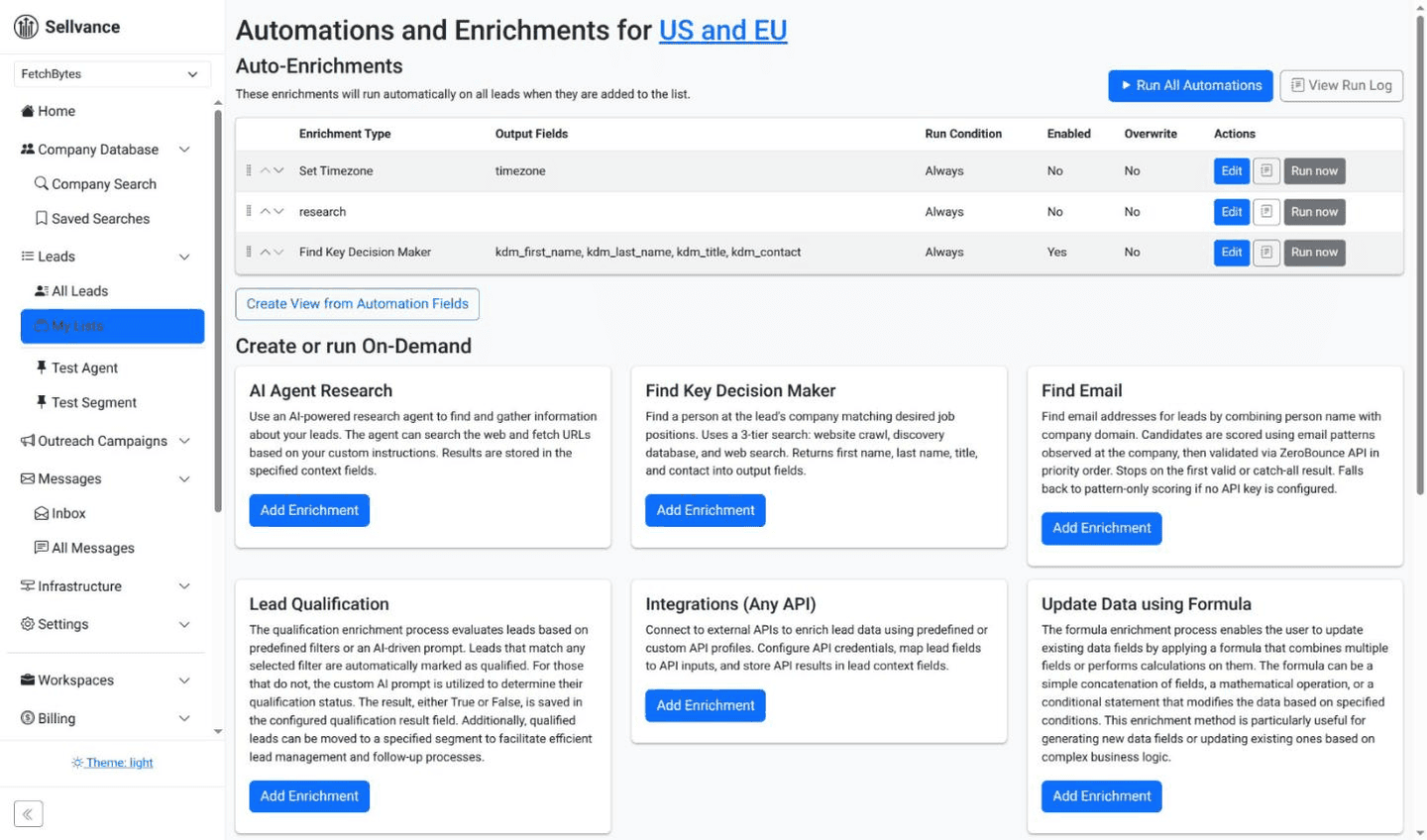
Automation rules that route leads into the right segments based on how they replied.
One inbox for every mailbox
With many mailboxes, checking each one isn't an option. Every reply should land in one place, and interested replies should get an answer within minutes, not tomorrow. Set up notifications and name one person who owns replies during business hours. There are three common setups:
Plain Forwarding
Every sending mailbox auto-forwards to one main inbox.
Pros: Simple, no extra tools, easy to share.
Cons: Your answer goes out from the main address, not the one that emailed the lead. That breaks the thread and can look suspicious to spam filters.
Unified Inbox in a Sending Tool
Many sending tools collect replies from all mailboxes into one screen.
Pros: Replies stay tied to the campaign and step that caused them.
Cons: You work inside the tool's interface, sorting is often weak, and if the tool is down, so is your inbox.
Two-Way Forwarding
Replies are forwarded to your main inbox, and your answer is sent back through the original sending mailbox.
Pros: The lead always hears from the same address. Works with the email client you already use.
Cons: Your sending platform has to support it.
Sellvance pauses a lead's sequence when they reply, routes them into segments with lead automations, and forwards replies to your main inbox while sending your answers back through the original mailbox. Segments, custom fields and AI qualification give you a lightweight CRM next to the campaign itself.
See lead managementTrack every conversation to a decision
Once replies come in every day, you need one record of where each conversation stands, or follow-ups get missed. Whether that's a full CRM or the lead management in your outreach tool, it needs a few things:
- Automatic import. An interested reply creates a record with the company, the person, the email they answered and the campaign it came from. No copy-pasting.
- Clear stages. Replied, call booked, call held, proposal sent, won, lost. Move leads between stages automatically where an event makes it obvious, such as a booked meeting.
- Outreach fields. Segment, reply category, campaign, and the enrichment data you qualified on, such as funding stage or whether pricing is public.
- A link back to the experiment. Tag each deal with the campaign and offer that produced it. That's how you learn whether the replies you scaled on turn into customers the way your threshold assumed.
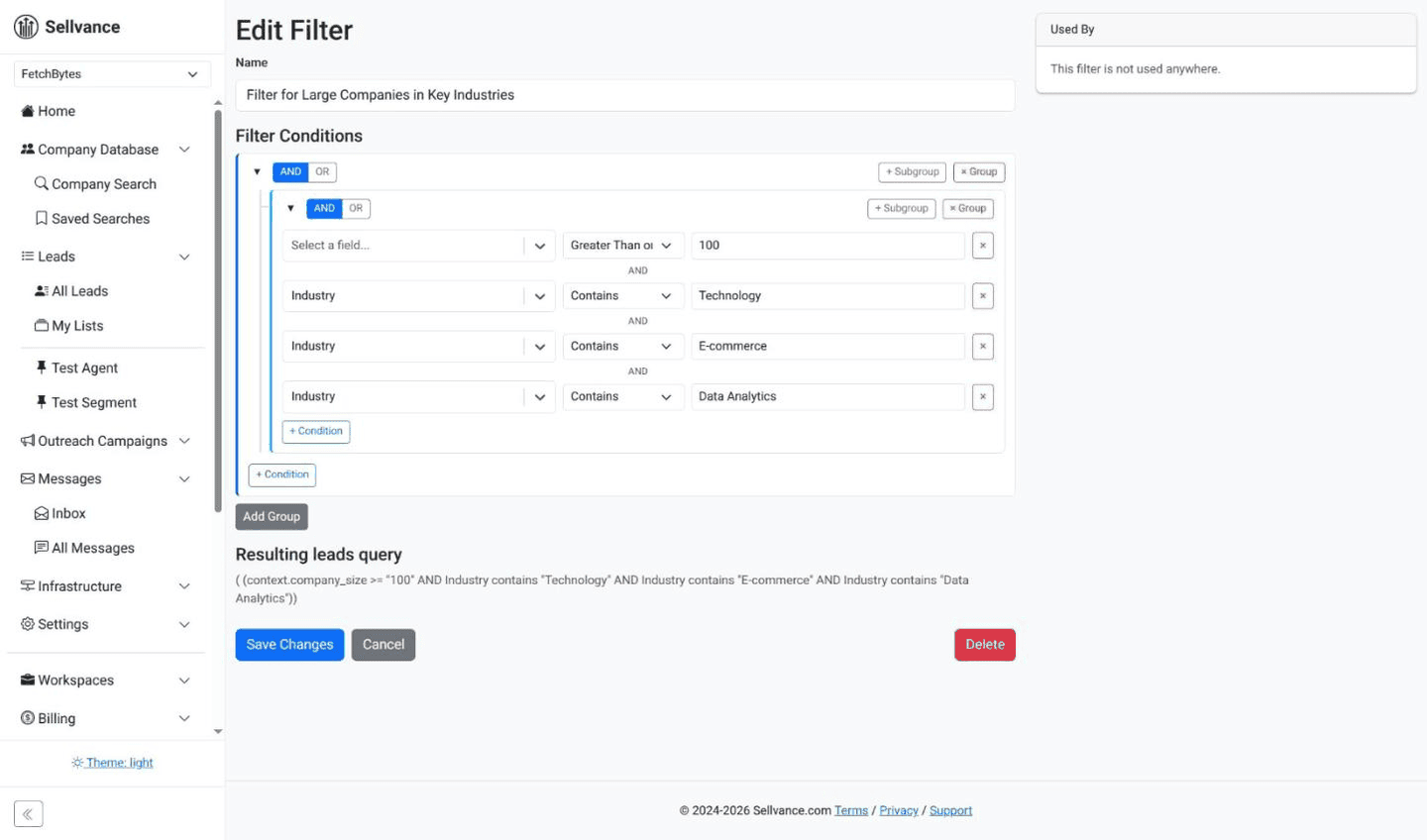
Filters to find leads by any combination of fields.
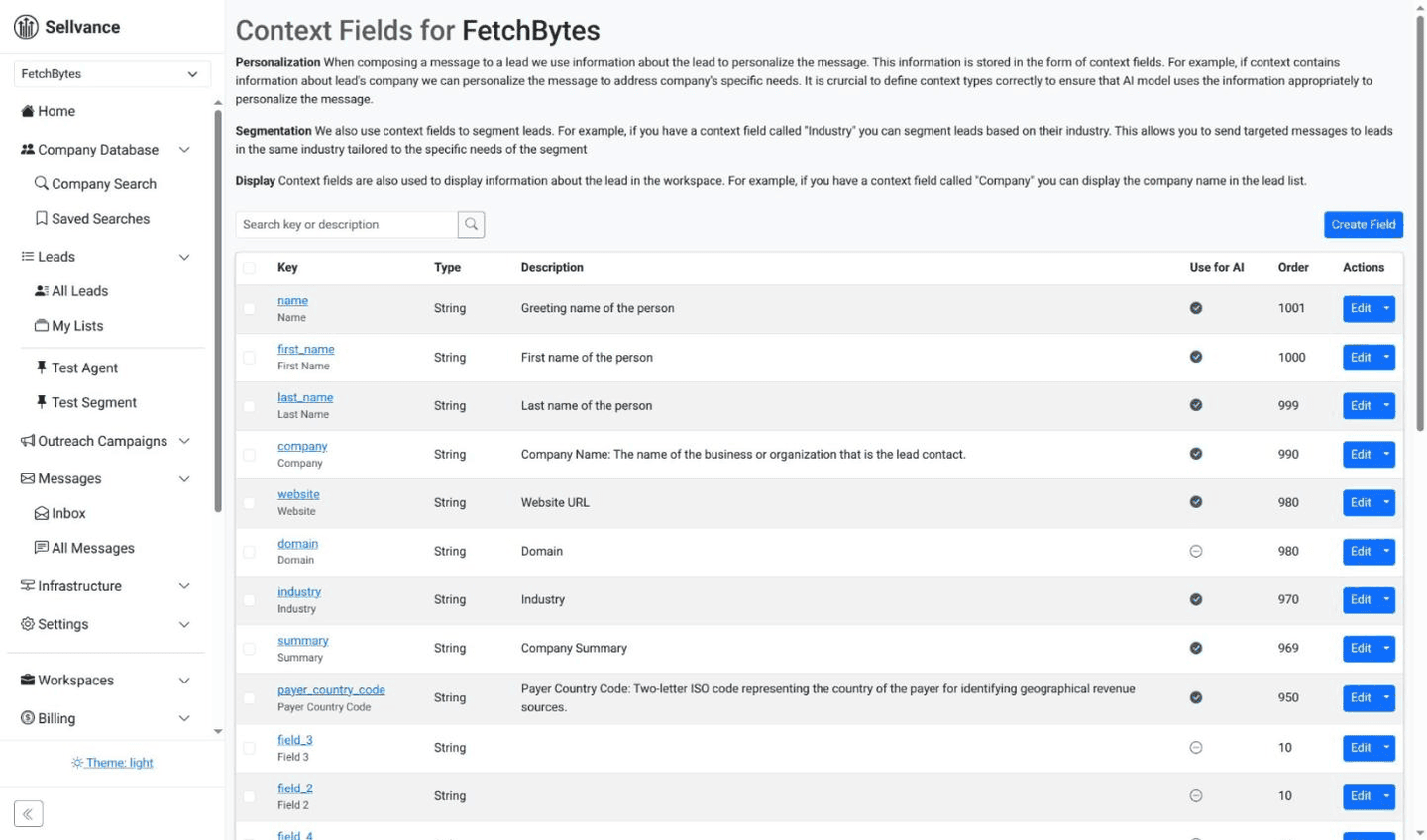
Custom fields for the data your follow-up depends on.
Match the setup to your stage. A founder selling alone doesn't need an enterprise CRM. Every hour spent configuring one is an hour not spent talking to the people who replied.
Follow-ups and calls
A reply that says "interested" is where the sales work starts. More replies won't help if they stall between the inbox and the call.
Make booking easy
When someone is interested, answer with a direct link to your calendar from a scheduling tool. Cut every extra step: no forms, no "what times work for you?" back-and-forth. If interested leads don't book, look at your reply speed and the wording of your answer first.
Reduce no-shows
- Right after booking: confirm the time, your name, a short agenda and what they'll get from the call.
- A day before: a two-line reminder with the meeting link.
- An hour before: a last short reminder. A LinkedIn message or SMS often gets seen faster than email.
- If they don't show: within 15 minutes, send a friendly note with a link to rebook. Don't give up after one miss.
Listen more than you talk
The call isn't a pitch. Its job is to help the prospect decide, by finding their main problem and showing how you solve it. Let them do most of the talking. When they describe the problem in their own words, they're convincing themselves.
Ask open questions: "What made you take this call?" "What have you tried already?" "What happens if nothing changes?" "What would good look like in six months?"
Learn from your calls
Record calls and review them in batches of ten. Note which questions opened people up, where they pulled back, and which objections came up again and again. Keep a simple sheet: length, questions asked, objections, outcome.
What you hear on calls is also material for your next experiment. A repeated objection is a hypothesis about the offer. A group of prospects that keeps saying "not for us" is a hypothesis about the segment. Test those on fresh companies. Don't patch them into the campaign that's already running.
When a scaled campaign drifts, go back to an experiment
A works verdict is true for the conditions it was measured in. Scaling changes some of them: new mailboxes, new domains, more companies from further down the segment. Watch the scaled campaign for signs that it no longer matches the one you proved:
- Delivery drops. Out-of-office replies thin out, placement tests start landing in spam, or a domain shows up on a blacklist.
- Unsubscribes and complaints rise. People are telling you the message reaches the wrong companies, or reaches them too often.
- Replies change character. Fewer interested answers, more "not relevant" ones, as the list moves past the companies that fit best.
The instinct is to push harder: more mailboxes, more follow-ups, more companies. Don't. Lower the daily limit or pause, find what changed, and fix delivery first if that's where the problem is. Then run a new experiment on fresh companies with a threshold and sample size set in advance. Scale again only when it earns its own works verdict.
The free Experiment Planner turns your price, conversion and cost per email into a threshold and shows how many sends a verdict will take. In Sellvance, the Signal Check's harm verdict flags a campaign whose unsubscribes and complaints climb, so you know when to stop scaling and start testing again.
Open the Experiment PlannerYour scaling checklist
Go through this before you raise a single limit, and again every few weeks while the scaled campaign runs.
- The experiment has a works verdict: delivery passed, interest conclusive at the planned sample
- Enough uncontacted companies remain in the segment to scale into
- The experiment is closed, and the scale-up runs as a separate campaign
- Segment, offer, copy and sequence are copied unchanged from the winning experiment
- New mailboxes are warmed before they join, and the daily limit rises in steps
- Warmup keeps running on every mailbox alongside cold sends
- Blacklists checked and inbox placement tested weekly
- Replies land in one inbox and are sorted: interested, not right now, out of office
- Every interested reply is tracked to a decision, tagged with its campaign and offer
- Calls have a booking link, reminders and a no-show follow-up, and get reviewed in batches
- Delivery, unsubscribes and complaints are watched; a drift sends you back to an experiment
Got a Works Verdict? Scale It Without Losing It.
Sellvance runs the whole loop in one place: managed domains and mailboxes, inbox placement tests, a Signal Check verdict on every experiment, and autopilot campaigns to scale the ones that work.
Start your first experiment